
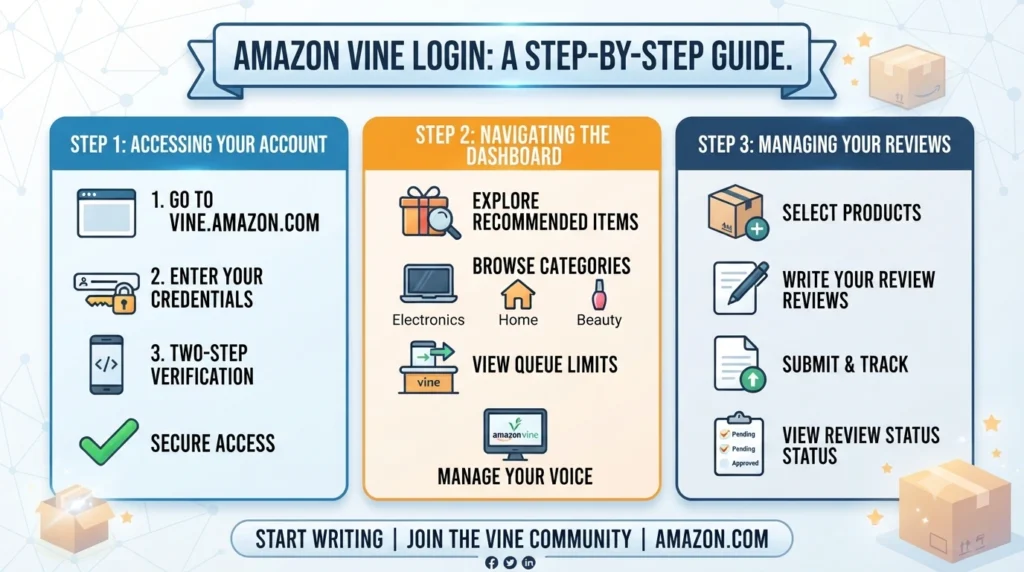
Amazon Vine Login: How to Access Your Account and Manage Reviews.
Introduction
Amazon offers several services for shoppers and sellers, but one programme has a different purpose: Amazon Vine. It is designed to help customers discover products through reviews written by selected reviewers known as Vine Voices.
For people who have been invited to participate, understanding the Amazon Vine login process is important. Signing in allows eligible members to access the Vine programme, explore available products, request items and manage their review responsibilities.
However, Amazon Vine does not work like a regular shopping account or a public registration service. Access is invitation-based, and having a standard Amazon account does not automatically make someone a Vine member.
This guide explains how Amazon Vine login works, where to access the programme, how to manage your account, what to do if you cannot sign in and how the review process works.
What Is Amazon Vine?
Amazon Vine is an invitation-only product review programme. Amazon selects certain customers, known as Vine Voices, and gives them the opportunity to request eligible products from participating sellers at no cost.
In return, Vine Voices are expected to try the products and publish honest, independent reviews. These reviews help other customers understand a product’s quality, features and practical performance before making a purchase.
The programme has two different sides:
-
Reviewer side: Invited customers access Vine to browse available products, request items and submit reviews.
-
Seller side: Eligible Amazon sellers use Seller Central to enrol products and make units available to Vine reviewers.
Understanding this difference is important because the login process and account dashboard are not the same for reviewers and sellers.
How to Access Amazon Vine Login
If you have received an invitation to become a Vine Voice, you can access the programme using the Amazon account associated with your invitation.
The process is generally straightforward.
Step 1: Open Your Amazon Marketplace
Visit the Amazon website for the country where your Vine invitation was issued.
For example, customers using Amazon India should access the programme through the Amazon.in marketplace. Vine availability and account access can differ between countries.
Step 2: Sign In to Your Amazon Account
Use the same Amazon account that received the Vine invitation.
Enter your registered email address or mobile number and password. If Amazon requests additional verification, complete the security check.
Using a different Amazon account may prevent you from seeing your Vine membership.
Step 3: Open the Vine Programme
After signing in, navigate to the Amazon Vine section for your marketplace.
If you have been accepted into the programme, you should be able to access the relevant Vine features through your eligible account.
If the programme does not appear, check whether you are using the correct Amazon account and marketplace.
Step 4: Explore Your Vine Dashboard
Once access is available, you can explore the programme’s interface.
Depending on your marketplace and account, the dashboard may provide access to:
-
Available products
-
Product categories
-
Product request options
-
Your requested items
-
Review submission options
-
Review status and activity
Step 5: Select a Product
Browse the available products and read their descriptions carefully.
Consider whether the product is relevant to your interests and whether you can provide a useful review based on actually trying it.
Step 6: Submit Your Review
After receiving and using the product, write an honest review based on your experience.
Your review should explain what worked well, what could be improved and any important details that might help another shopper.
Amazon Vine Login for Reviewers vs Sellers
One common source of confusion is that Amazon Vine reviewers and sellers use different account areas.
Although both participate in the same programme, their responsibilities are different.
| Comparison | Vine reviewer | Amazon seller |
|---|---|---|
| Main account | Regular Amazon shopping account | Amazon Seller Central |
| Access | Invitation-based | Seller eligibility requirements |
| Main purpose | Request products and write reviews | Enrol eligible products |
| Dashboard | Vine reviewer interface | Seller Central Vine dashboard |
| Products | Select available Vine items | Submit products for reviewer participation |
| Main responsibility | Honest product feedback | Provide eligible products and manage enrolments |
A reviewer should not try to use Seller Central to access their Vine product selection.
Similarly, sellers should use their Seller Central account to manage product enrolments rather than trying to access the reviewer dashboard.
How to Use the Amazon Vine Dashboard
The Vine dashboard is where members manage their programme activity.
Its layout and available options may differ by marketplace, but the main purpose is to help reviewers discover products and manage their reviews.
1. Browse Available Products
The product section allows Vine Voices to explore items currently offered through the programme.
Availability depends on participating sellers, product inventory and marketplace activity.
Not every product will remain available. Some items may be claimed by other reviewers before you select them.
2. Check Product Information
Before requesting an item, review its listing carefully.
Pay attention to:
-
Product description
-
Available images
-
Size and colour options
-
Product specifications
-
Intended use
-
Important limitations
Choosing products that genuinely interest you makes it easier to write detailed and useful reviews.
3. Manage Requested Products
Keep track of products you have requested and received.
This helps you organise your reviewing activity and avoid losing track of items that still need attention.
4. Submit Product Reviews
Once you have received and tried a product, use the available review option to share your experience.
A useful review should be clear, specific and based on actual product use.
For example, rather than writing only that a product is good, explain how easy it was to use, whether it performed as described and what a potential buyer should know.
5. Monitor Your Review Activity
Check your account regularly to see whether your reviews have been submitted and published.
If a review is not appearing, allow time for Amazon’s review moderation process. Also check whether it has been rejected or requires attention.
How to Write Better Amazon Vine Reviews
Writing reviews is the main responsibility of a Vine Voice. The purpose is not simply to give a product a high rating. It is to help other shoppers make informed decisions.
Here are some ways to make your reviews more useful.
Describe Your Actual Experience
Explain what happened when you used the product.
For example, if you received a kitchen appliance, discuss its setup, ease of use, performance and cleaning requirements.
Avoid making claims about features you have not tested.
Mention Both Strengths and Weaknesses
A balanced review is generally more informative than a review that contains only praise.
If something worked well, explain why. If you experienced a problem, describe it clearly and fairly.
Include Relevant Details
Different products require different types of feedback.
For example:
-
Clothing: Fit, fabric, comfort and sizing.
-
Electronics: Setup, performance, controls and usability.
-
Kitchen products: Materials, functionality and cleaning.
-
Home accessories: Build quality, installation and practical use.
-
Personal care products: Packaging, texture and ease of application.
Keep the Language Clear
Write in simple language that other customers can understand.
You do not need complicated vocabulary or exaggerated descriptions to make a review helpful.
Follow Amazon’s Review Guidelines
Amazon expects Vine Voices to provide honest and unbiased opinions.
The programme’s reviews are identified as reviews of products received free through Vine. Accepting additional compensation or direct incentives from sellers in exchange for reviews is prohibited.
Who Can Join Amazon Vine?
Amazon Vine is not an open registration programme.
Customers cannot simply create a Vine account by completing a public application form. Amazon invites selected customers based on the quality and usefulness of their contributions to the Amazon community.
Amazon explains that it considers the insightfulness of reviews customers have previously published when selecting Vine Voices.
Although Amazon does not provide a guaranteed formula for receiving an invitation, maintaining a useful review history is a sensible starting point.
Ways to Build a Helpful Review History
If you are interested in becoming a Vine Voice, consider these practices:
-
Write reviews after genuinely using products you purchase.
-
Explain your experience rather than repeating product descriptions.
-
Include useful details that other shoppers may not notice.
-
Keep feedback honest, even when your experience is negative.
-
Avoid promotional language and exaggerated claims.
-
Follow Amazon’s community guidelines.
These practices can improve the usefulness of your contributions, but they do not guarantee an invitation.
Is Amazon Vine Login Free?
For reviewers, accessing the Vine programme does not require purchasing a Vine membership.
However, receiving a product free of charge does not necessarily mean there are no tax implications.
Amazon’s programme information states that Vine Voices may have tax responsibilities associated with products received. The applicable rules depend on the country and the individual’s circumstances.
For sellers, participation is different. Sellers may need an eligible selling account, suitable product listings and fulfilment arrangements. Amazon may also charge programme enrolment fees depending on the marketplace and applicable fee structure.
Therefore, reviewers and sellers should not confuse the costs and conditions associated with their respective roles.
Amazon Vine Login Problems and How to Fix Them
Sometimes users may have difficulty accessing their Vine account. The problem could relate to account credentials, marketplace selection, invitation status or technical issues.
Here are some common situations and possible solutions.
1. Amazon Vine Is Not Showing in Your Account
If you sign in but cannot find the Vine programme, check whether you are using the account that received the invitation.
Also make sure you are accessing the correct Amazon marketplace.
If you have never received an invitation, you may not be eligible to access the reviewer dashboard.
2. Incorrect Email or Password
If Amazon does not accept your login details, verify that you are entering the correct email address or mobile number.
If you cannot remember your password, use Amazon’s official account recovery process.
Avoid sharing login credentials with anyone claiming to provide Vine account access.
3. Login Verification Problems
Amazon may request an additional security verification before allowing access.
Check whether the verification code has arrived on your registered device or email account.
If you are not receiving the code, check your network connection, spam folder and registered contact details.
4. Vine Dashboard Is Not Loading
A dashboard that does not load properly may be caused by a browser issue or temporary service problem.
Try the following:
-
Refresh the page.
-
Sign out and sign in again.
-
Clear your browser cache.
-
Try another supported browser.
-
Update your Amazon mobile application.
-
Check your internet connection.
5. Product Requests Are Not Available
If you can access Vine but cannot find products to request, it may simply be that no suitable products are currently available.
Product selection changes according to seller participation and inventory.
You can check the dashboard again later rather than assuming your account has a problem.
6. Review Submission Is Not Working
If you cannot submit a review, check whether the product has been delivered and whether the review option is available.
Make sure your review follows Amazon’s community guidelines.
If the problem continues, use the official support option available to Vine members.
Is Amazon Vine Safe to Use?
Amazon Vine is an official Amazon programme, but users should still take precautions when accessing their accounts.
A genuine Vine invitation should direct you towards an Amazon-controlled service rather than asking you to provide account details through an unrelated website.
Consider the following safety practices:
Use the correct Amazon website: Access Vine through the marketplace associated with your account.
Check the website address: Be cautious of messages containing unfamiliar sign-in pages or suspicious links.
Protect your password: Never share your Amazon password or verification codes with another person.
Enable account security features: Use the security options available for your Amazon account.
Avoid unofficial invitations: Do not trust messages promising guaranteed Vine membership in exchange for money.
Follow programme rules: Only request products through the official Vine programme and submit genuine reviews.
Amazon’s community guidelines also make clear that Vine reviews must reflect the reviewer’s honest and unbiased experience.
Amazon Vine Login for Sellers: How to Access Seller Central
If you are an Amazon seller looking to enrol products in Vine, you need to use Seller Central rather than the reviewer dashboard.
The seller process has separate eligibility requirements.
According to Amazon’s published programme information, sellers generally need a Professional selling account, the appropriate brand role where applicable, and eligible Fulfilment by Amazon (FBA) offers. Requirements may vary by marketplace.
Steps for Sellers to Access Amazon Vine
-
Sign in to your Amazon Seller Central account.
-
Confirm that your selling account meets the programme requirements.
-
Check that your brand and product listings are eligible.
-
Open the Advertising section in Seller Central.
-
Select Vine from the available options.
-
Review eligible products and enrolments.
-
Choose the number of units to make available.
-
Monitor product requests and published reviews through the Vine dashboard.
What Can Sellers Manage?
The Seller Central Vine dashboard allows sellers to monitor their enrolled products.
Depending on the marketplace and account, sellers can check:
-
Product enrolment status
-
Units made available
-
Units claimed by reviewers
-
Published reviews
-
Enrolment blockers
-
Review progress
-
Cancellation or stopping options
Amazon’s seller guidance explains that the dashboard can display different enrolment statuses, including concluded, reviews in progress, awaiting reviews, cancelled and action required.
Amazon Vine Alternatives for Product Reviews
Amazon Vine is a specific Amazon-managed programme, so there is no direct alternative that provides exactly the same reviewer invitation system within Amazon.
However, sellers can use other legitimate methods to collect customer feedback.
1. Amazon’s Request a Review Feature
Eligible sellers can use Amazon’s Request a Review feature through Seller Central to request feedback from customers after a purchase.
It provides an Amazon-supported way to ask customers for a product review without offering an incentive.
2. Amazon Customer Reviews
Customers can independently publish reviews based on their purchasing and product experiences.
Sellers can monitor this feedback to understand common product strengths and weaknesses.
3. Post-Purchase Customer Feedback
Businesses can collect feedback through appropriate customer communication channels, surveys and support interactions.
However, they should not offer prohibited incentives or attempt to manipulate Amazon product ratings.
4. Product Testing Outside Amazon
Businesses may also organise independent product testing and research programmes.
These can provide useful insights before a product launch, provided the business follows applicable consumer protection, advertising and review disclosure requirements.
The important distinction is that external feedback programmes do not automatically create eligible Amazon product reviews.
Conclusion
Amazon Vine login gives invited reviewers access to a programme where they can request eligible products and share honest feedback with other shoppers. The process starts with signing in to the correct Amazon account and opening the Vine section for the relevant marketplace.
However, it is important to understand that Vine is not an ordinary Amazon shopping feature. Membership is invitation-based, and reviewers have responsibilities that include trying products and submitting genuine reviews.
Sellers also use the programme, but they access it through Seller Central and must meet separate eligibility requirements.
Whether you are an invited reviewer or an Amazon seller, understanding the correct login process and dashboard can make participation easier. Always use official Amazon services, protect your account information and follow the programme’s current rules.
How do I log in to Amazon Vine?
Sign in using the Amazon account associated with your Vine invitation. Then open the Vine programme for the relevant Amazon marketplace. If you have not received an invitation, you will not automatically gain access to the reviewer dashboard.
Can anyone create an Amazon Vine account?
No. Amazon Vine is an invitation-only programme for reviewers. Customers cannot simply register through a public application form to become Vine Voices.
Is Amazon Vine login different from Amazon Seller Central login?
Yes. Vine reviewers use their regular Amazon shopping accounts to access the reviewer programme. Sellers use Seller Central to enrol products and manage their Vine participation.
Why can't I see Amazon Vine after logging in?
You may be using a different Amazon account, accessing the wrong marketplace or may not have an active Vine invitation. Check your account details and invitation status before trying other troubleshooting steps.
Do Amazon Vine members have to pay for products?
Vine Voices can request eligible products through the programme without paying the normal product purchase price. However, tax obligations may apply depending on the country and individual circumstances.