
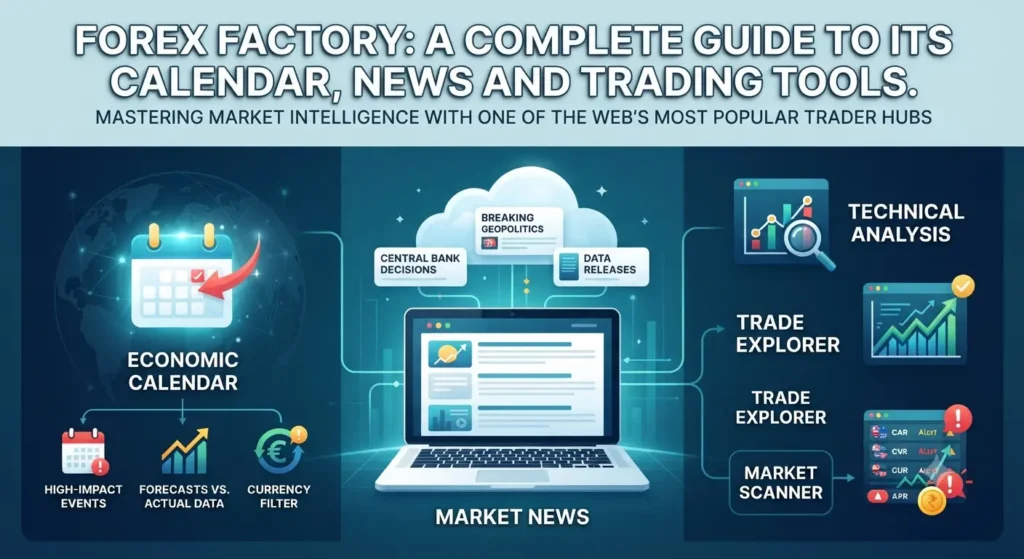
Forex Factory: A Complete Guide to Its Calendar, News and Trading Tools.
Introduction
Keeping track of currency markets involves more than watching exchange rates. Economic announcements, central bank decisions, inflation reports and unexpected global events can all influence how currency pairs move. For traders, knowing when important news is scheduled and understanding what is happening in the market can be just as important as analysing price charts.
This is where Forex Factory becomes useful. It is an online platform that brings together forex-related information, including an economic calendar, market news, trading discussions, market data and broker research. Instead of switching between several websites to follow market developments, users can explore many trading resources in one place.
However, Forex Factory is more than an economic calendar. Its different sections serve different purposes, and understanding how to use them can make the platform easier to navigate.
This guide explains what Forex Factory is, how its main tools work, how to read its economic calendar, and how traders can use its information as part of a structured trading routine.
What Is Forex Factory?
Forex Factory is an online platform that provides forex market information and resources for traders around the world.
Its primary focus is helping users follow market developments, understand economic events and explore trading-related discussions. The platform brings together several products, including:
-
Calendar: Displays upcoming and recently released economic events.
-
News: Provides curated financial and forex-related news.
-
Market: Offers currency and other market instruments, charts and price information.
-
Forums: Allows traders to discuss strategies, market conditions and trading experiences.
-
Trades: Provides insight into trading activity from participating accounts.
-
Trade Explorer: Offers tools for reviewing and analysing trading performance.
-
Brokers: Helps users research forex brokers and compare available information.
These sections make Forex Factory useful for both traders who are learning about financial markets and experienced participants who want to monitor market developments.
It is important to understand that Forex Factory is an information and trading-resource platform, not a broker that executes trades on behalf of users. Traders generally use a separate brokerage account and trading platform to place orders.
Why Do Traders Use Forex Factory?
Forex traders need to consider several types of information before making decisions. A currency pair may be moving because of technical factors, economic data, interest-rate expectations or a major news event.
Forex Factory helps users bring some of this information together.
1. Tracking Economic Announcements
Economic announcements can influence currency prices, particularly when the released figures differ significantly from market expectations.
For example, inflation data from the United States may affect expectations about Federal Reserve interest-rate decisions. Those expectations can influence the US dollar and related currency pairs.
The Forex Factory calendar helps traders identify when such announcements are scheduled.
2. Following Market News
Economic reports are only one part of the market picture. Political developments, central bank comments, financial instability and unexpected events can also influence currencies.
The News section provides curated stories that help users follow these developments.
3. Understanding Market Sentiment
The Forex Factory forums allow traders to discuss market movements and share their perspectives.
Reading these conversations can help users understand how other market participants are approaching a particular currency pair or economic event.
However, forum opinions should not be treated as verified trading advice.
4. Reviewing Trading Performance
The Trade Explorer provides analytical tools for examining trading performance. It can help users understand their historical results and identify areas that may need improvement.
This is useful because keeping records and reviewing past decisions are important parts of developing a disciplined trading process.
Understanding the Forex Factory Economic Calendar
The Forex Factory economic calendar is one of its most widely used tools. It displays scheduled economic events from different countries and provides information that traders can use to prepare for possible market volatility.
An economic calendar is particularly useful for people who trade currency pairs affected by interest rates, inflation, employment figures and other economic indicators.
What Information Does the Calendar Show?
The calendar generally displays several important details.
| Calendar field | What it means |
|---|---|
| Date and time | When an economic event is scheduled |
| Currency | The currency associated with the event |
| Impact | The expected level of market importance |
| Event | The name of the economic announcement |
| Actual | The reported result after release |
| Forecast | The market’s expected result |
| Previous | The earlier reported figure |
| Graph or details | Additional historical or event information where available |
Understanding these fields helps traders interpret economic announcements more effectively.
What Do Actual, Forecast and Previous Mean?
These three values are particularly important when reading the Forex Factory calendar.
Actual: This is the figure reported when the economic data is released.
Forecast: This represents the market’s expected result before the announcement.
Previous: This is the figure from the earlier reporting period, sometimes subject to revision.
Consider a hypothetical inflation announcement:
| Data field | Example |
|---|---|
| Previous | 3.2% |
| Forecast | 3.0% |
| Actual | 3.4% |
In this example, inflation came in above the forecast. Traders may interpret this as a sign that price pressures remain stronger than expected.
However, the market reaction is not guaranteed. Investors also consider the broader economic outlook, central bank expectations and other available information.
Understanding Forex Factory Impact Levels
Forex Factory uses impact ratings to help users identify events that may be more relevant to market movements.
The calendar commonly distinguishes between three levels:
-
High impact: Events considered more likely to influence financial markets significantly.
-
Medium impact: Events that may affect market conditions but are generally considered less important than high-impact releases.
-
Low impact: Events with a comparatively smaller expected market influence.
These ratings are useful for prioritising events, but they do not predict the exact size or direction of a price movement.
A high-impact announcement does not always produce a large market reaction. Sometimes the result is already reflected in prices, or the reported figure is close to expectations.
How to Use the Forex Factory Calendar
Beginners can follow a simple process to make the calendar easier to understand.
-
Open the calendar and review the events scheduled for the day.
-
Check the currency associated with each announcement.
-
Identify events marked as high impact.
-
Compare the forecast with the previous figure.
-
Wait for the actual result when the announcement is released.
-
Review the market reaction rather than assuming a particular direction.
-
Compare the information with other reliable sources before making a trading decision.
For example, someone monitoring EUR/USD may pay particular attention to major economic announcements from the United States and the euro area.
The purpose is not to trade every announcement. It is to understand when important information is entering the market.
How to Set the Correct Time Zone on Forex Factory
Time-zone settings are important because economic announcements are scheduled according to different regional time standards.
A trader in India, for example, may need to convert a US economic announcement into Indian Standard Time. Doing this manually can create confusion, particularly when daylight saving time changes in other countries.
Forex Factory provides time-zone settings to make this easier.
Steps to Adjust Your Time Zone
-
Open the Forex Factory website.
-
Locate the clock or time-zone control in the website header.
-
Open the time-zone settings.
-
Select the option to match your device automatically or choose a time zone manually.
-
Confirm that the displayed time matches your local clock.
For users in India, selecting the appropriate Indian time zone helps display event times in IST.
Forex Factory’s user guide explains that its timestamps adjust according to the selected time zone. It also accounts for daylight saving changes where applicable.
Why does this matter?
Suppose an important US economic announcement is scheduled for a particular time in New York. Its corresponding time in India may change depending on whether the United States is observing daylight saving time.
Correct time-zone settings reduce the risk of missing an announcement or preparing for it at the wrong time.
Exploring the Forex Factory News Section
The Forex Factory News section helps traders follow financial developments that may influence currency markets.
The platform curates stories from financial media, central banks, brokers, financial institutions and other sources. Its editorial team selects and organises news based on its relevance to traders.
News content can cover several areas.
Breaking News
Breaking news refers to new information that may have the potential to influence markets.
Examples include unexpected central bank announcements, major geopolitical developments or significant financial events.
These stories may be classified according to their potential market impact.
Fundamental Analysis
Fundamental news focuses on economic and financial factors that can influence currency values.
Common subjects include:
-
Inflation and employment data.
-
Interest-rate expectations.
-
Central bank policy.
-
Economic growth.
-
Government decisions.
-
International trade developments.
For example, news about a possible interest-rate change may influence expectations about a country’s currency.
Technical Analysis
Technical analysis focuses on price behaviour, chart patterns and market levels.
Stories in this category may discuss currency pairs, support and resistance, trends or possible trading setups.
Traders should remember that technical analysis represents an interpretation of market data. It does not guarantee future price movements.
Newer News Features
Forex Factory has continued to update its news experience.
In 2026, the platform introduced features such as Hot Stories, improved news comments and charts on high-impact breaking news stories. These tools are intended to help users examine market developments and price reactions without constantly switching between sections.
The availability and presentation of features may change as the platform evolves.
What Is the Forex Factory Market Section?
The Market section provides information about currency instruments and other financial markets.
According to Forex Factory’s user guide, its market infrastructure aggregates price information from multiple sources. The section includes forex instruments as well as other market-related instruments.
Users can explore tools such as the Market Scanner, charts and trading-session timeline.
Market Scanner
The Market Scanner provides an overview of selected instruments and their price movements.
It allows users to examine different metrics and look at changes over selected periods.
For example, a trader may use it to compare recent movements in EUR/USD, GBP/USD and USD/JPY.
The scanner can help users identify which instruments are showing notable activity, but it should not be treated as a signal generator.
Market Charts
Forex Factory also provides charts that help users examine price movements.
Charts can be useful for understanding recent market behaviour and comparing price changes across different time periods.
Traders who rely on technical analysis may use these charts alongside other charting tools.
However, chart data and prices can differ between providers because forex trading takes place in an over-the-counter market rather than through one central exchange.
Forex Factory’s own user guide advises users to consult multiple sources and explains that market data is supplied for informational purposes, not as financial advice or a guaranteed basis for trading decisions.
Forex Trading Sessions
The platform includes a sessions timeline showing the major forex trading sessions:
-
Sydney
-
Tokyo
-
London
-
New York
These sessions represent important centres of global forex activity.
Market activity can change as different financial centres open and close. Traders often monitor session overlaps because participation and liquidity may increase during certain periods.
However, forex does not have one central exchange with universal opening and closing hours. Forex Factory uses practical session definitions based on published market-hours information, and session times can shift because of daylight saving changes.
Forex Factory Forums: Learning From Other Traders
The Forex Factory forums provide a space where traders can exchange ideas, discuss strategies and share experiences.
Topics range from beginner questions to detailed discussions about specific currency pairs and trading approaches.
What Can You Find in the Forums?
Common discussion areas include:
-
Technical analysis.
-
Fundamental analysis.
-
Trading strategies.
-
Risk management.
-
Trading psychology.
-
Broker experiences.
-
Automated trading systems.
-
Trading journals and performance discussions.
These conversations can be useful for understanding how other people approach the market.
For example, a trader who follows GBP/USD might find discussions about important price levels, upcoming economic events or recent market volatility.
Are Forex Factory Forum Discussions Reliable?
Not every post should be treated as accurate or suitable for making trading decisions.
Forum members have different levels of experience, trading styles and financial objectives. Some may share useful analysis, while others may present personal opinions or untested strategies.
A sensible approach is to:
-
Check the reasoning behind a trading idea.
-
Look for supporting evidence.
-
Compare opinions with independent market information.
-
Avoid following trade calls without understanding the risks.
-
Never share account passwords or sensitive financial details.
The forums are best used as a place for discussion and learning, not as a substitute for independent research.
What Is Forex Factory Trade Explorer?
The Trade Explorer is a performance-analysis tool designed to help traders examine their trading history and results.
Rather than focusing only on whether a trade was profitable, performance analysis can help users understand how consistently they follow their trading approach.
Forex Factory’s Trade Explorer offers analytical metrics and interactive graphs. It can also synchronise with a connected brokerage account to display trading information.
What Can Traders Analyse?
Depending on the available account data and metrics, traders can examine areas such as:
-
Historical trading performance.
-
Account balance and equity.
-
Profit and loss.
-
Trading consistency.
-
Open-trade performance.
-
Changes in results over time.
For example, a trader might notice that most losses occur during periods of high market volatility. Reviewing this pattern could encourage them to examine their risk management and entry decisions.
The main benefit is the opportunity to learn from actual trading activity rather than relying entirely on memory.
Forex Factory Trades: Understanding Trading Activity
The Trades section provides a view of trading activity from participating brokerage accounts.
Forex Factory describes this product as a way to explore traders’ trades, monthly performance rankings and aggregated positioning information.
This can offer an interesting perspective on how other participants are approaching the market.
However, copying another trader’s activity is not a reliable trading strategy.
A trade that works for one person may not suit someone else because of differences in:
-
Account size.
-
Risk tolerance.
-
Trading experience.
-
Leverage.
-
Entry and exit timing.
-
Investment objectives.
Use this section to explore market behaviour and trading approaches rather than automatically following other users.
Forex Factory Brokers: Researching Forex Brokers
Choosing a forex broker is an important decision for anyone interested in currency trading.
The Forex Factory Brokers section is designed to help users research brokers and review information about their services.
It includes broker-related details and spread information intended to support comparisons.
However, a broker appearing on a directory does not automatically mean it is suitable for every trader or authorised to serve users in every country.
Before opening an account, consider the following:
| Factor | What to check |
|---|---|
| Regulation | Is the broker authorised by the relevant financial regulator? |
| Trading costs | Review spreads, commissions and other charges |
| Withdrawals | Understand withdrawal methods and conditions |
| Platform | Check which trading platforms are supported |
| Instruments | Confirm which currency pairs and other products are available |
| Customer support | Check support channels and availability |
| Account conditions | Review minimum deposits, leverage and margin rules |
Traders in India should pay particular attention to applicable local regulations and the rules governing forex transactions. They should verify whether a broker and the offered products are permitted under the relevant Indian regulatory framework before depositing money.
A broker comparison page is a starting point for research, not a replacement for checking official regulatory records.
How to Create a Forex Factory Account
Users can explore several Forex Factory resources without necessarily creating an account. However, registration is useful for accessing member-related features and participating in the community.
The general registration process is straightforward:
-
Open the Forex Factory website.
-
Locate the registration or sign-up option.
-
Enter the information requested by the platform.
-
Complete any verification steps.
-
Review the account settings.
-
Configure time-zone preferences and available notifications.
The exact registration process may change, so follow the instructions displayed on the official website.
Why Create an Account?
A registered account can provide access to additional features, depending on the platform’s current settings.
These may include:
-
Participating in forum discussions.
-
Following other members.
-
Customising alerts.
-
Subscribing to calendar events.
-
Managing personal settings.
-
Using member-related trading tools.
One useful feature is the alerts system, which allows users to customise notifications for selected news stories, calendar releases, forum activity and price movements.
This can help traders follow specific developments without constantly refreshing the website.
How to Use Forex Factory as a Beginner
Forex Factory can initially feel overwhelming because it contains several products and a large amount of information.
Beginners do not need to use every feature immediately. Starting with a few basic tools is usually more practical.
Here is a simple way to approach the platform.
Step 1: Start With the Economic Calendar
Begin by reviewing the day’s scheduled economic announcements.
Focus on the currency involved, the event name, its impact rating and the expected release time.
Avoid trying to understand every economic indicator at once. Learn the commonly reported figures, such as inflation, employment and interest rates.
Step 2: Learn the Difference Between Major and Minor Events
Not every announcement has the same relevance to currency markets.
Start by understanding why central bank decisions, inflation reports and employment figures can influence market expectations.
You can then gradually explore less prominent economic releases.
Step 3: Read Market News
Check the News section to understand what is happening beyond the scheduled calendar.
This may provide useful context when interpreting an unexpected price movement.
Step 4: Explore the Forums Carefully
Read discussions about trading strategies, risk management and market analysis.
Focus on understanding the reasoning behind an idea instead of copying someone’s trade.
Step 5: Keep a Trading Journal
Record the reasons behind each trading decision, the market conditions and the eventual result.
You can use your journal alongside the Trade Explorer or other performance-analysis tools to review your progress.
Step 6: Practise Before Risking Real Money
If you are new to trading, consider learning through a demo account or other risk-free educational environment.
Forex trading involves the possibility of losing money. Understanding the platform does not automatically make someone a successful trader.
Common Mistakes to Avoid When Using Forex Factory
Forex Factory provides useful information, but the way users interpret that information matters.
Here are some common mistakes worth avoiding.
1. Trading Every High-Impact Announcement
A high-impact rating indicates that an event may be important. It does not mean a trade should automatically be placed when the announcement occurs.
Price movements can be unpredictable, particularly during periods of rapid market activity.
2. Ignoring the Time Zone
Incorrect time settings can cause traders to misunderstand when an announcement will take place.
Always confirm that the calendar displays your intended local time.
3. Treating Forecasts as Guaranteed Outcomes
Forecast figures are estimates, not confirmed results.
Even when actual data differs from expectations, the market may react in an unexpected way.
4. Following Forum Signals Without Research
Other traders may have different objectives, experience and risk tolerance.
Copying their positions without understanding the reasoning can expose you to unnecessary risk.
5. Depending on One Information Source
Forex Factory brings together useful market information, but it should not be the only source used for important financial decisions.
Check major announcements through official economic releases, central bank communications and other reliable sources.
6. Confusing Market Information With Financial Advice
Forex Factory provides tools and information. Its calendar, news, charts and forum discussions do not guarantee profitable trades.
Users remain responsible for evaluating risks and making their own decisions.
Forex Factory vs Other Economic Calendar Platforms
Forex Factory is not the only platform that provides economic calendar information.
Other financial websites and trading services also offer economic announcements, market news and analysis tools.
Here is a general comparison of the types of resources available:
| Platform | Main focus |
|---|---|
| Forex Factory | Economic calendar, forex news, forums and trading tools |
| Investing.com | Economic calendar, financial news and market data |
| Trading Economics | Economic indicators, historical data and forecasts |
| DailyFX | Forex education, analysis and market commentary |
| TradingView | Charts, technical analysis and community ideas |
Each platform serves slightly different needs.
Forex Factory may appeal to traders who want an economic calendar combined with an active trading community. TradingView is more focused on charting and technical analysis, while Investing.com offers a broader range of financial market information.
The best option depends on the information a trader needs and how they prefer to organise their research.
Conclusion
Forex Factory is a useful resource for traders who want to follow economic announcements, market news and trading discussions in one place. Its economic calendar is particularly helpful for identifying scheduled releases and understanding the difference between actual, forecast and previous figures.
Beyond the calendar, the platform offers forums, market charts, trading-session information, broker research and performance-analysis tools. These features can support a more organised approach to market research.
However, using Forex Factory does not guarantee better trading results. Economic forecasts can be wrong, market reactions can be unpredictable, and opinions shared by other traders may not suit your circumstances.
The most effective approach is to use Forex Factory as one part of a wider research routine. Combine its information with reliable sources, independent analysis, sensible risk management and a clear trading plan.
What is Forex Factory used for?
Forex Factory is used to follow forex market information, economic announcements, financial news and trading discussions. It also offers market tools, broker research and performance-analysis features.
Is Forex Factory free to use?
Many of its core information resources, including the calendar, news and forums, are available without a paid subscription. Some features may require registration or a member account. Check the current platform terms for details.
How accurate is the Forex Factory calendar?
Forex Factory maintains its calendar as a source of economic-event information and provides event details, forecasts and reported figures. However, users should verify important announcements against official releases and understand that forecasts are not guaranteed outcomes.
What do the red, orange and yellow impact indicators mean?
These colours are commonly used to distinguish high-, medium- and low-impact events, respectively. They indicate the event’s expected relevance to the market, not a guaranteed price movement.
Can I use Forex Factory in India?
Yes. Users in India can access Forex Factory’s website and explore its available information tools. They should configure the calendar to Indian Standard Time and independently check applicable Indian rules before engaging in forex transactions.